How SKUuz's Import from Shopify Builds Your Entire PIM — Not Just Fills a Spreadsheet

If you've ever evaluated a PIM for your Shopify store, you know the drill. Install the tool. Manually create your product types. Define every attribute by hand. Set up field mappings. Configure export templates. Then — finally — import your products and hope everything lines up. Most merchants spend days or weeks on this setup before a single product is enriched.
We built SKUuz to work the opposite way. When you connect your Shopify store, the import itself does the setup. Your first product pull isn't just a data migration — it's the system learning your catalog and configuring itself to manage it.
The Traditional PIM Problem
Every PIM on the market today treats import as a terminal step. You export a CSV from Shopify, massage it into the PIM's expected format, map columns to fields, and load it in. Your product types, taxonomy categories, custom attributes, and metafield definitions? Those are your problems to configure before the data arrives.
This creates what we call the greenfield setup tax — the hours, days, or weeks of manual configuration required before a PIM can do anything useful. For a merchant with 500 SKUs across a dozen product types, each with unique metafields, this can easily consume a full work week.
The real cost
The greenfield setup tax isn't just time — it's accuracy. Manually recreating your Shopify schema in another tool means every typo, every missed metafield, every inconsistent product type name becomes a data quality issue you'll discover weeks later during export.
What SKUuz Does Differently
When SKUuz pulls your products from Shopify's GraphQL Admin API, it isn't just copying rows into a database. The import function inspects every product's structure and builds three things simultaneously: your product data, your catalog schema, and the bidirectional field mappings required to push changes back to Shopify.
Here's what happens in a single import operation:
Source Discover Classify Map Result
Shopify GraphQL→ Schema Seeding→ Category + Type→ Field Mappings→ Export-Ready PIM
1. Attribute discovery and schema seeding
The first time SKUuz encounters a product, it reads every field Shopify sends — core fields like title, vendor, and descriptionHtml, plus every custom metafield attached to the product. For each new attribute it discovers, it automatically creates the corresponding attribute metadata entry with the correct data type, display label, and mapping configuration. By the end of your first import, your PIM schema matches your Shopify catalog exactly — without you touching a settings page.
2. Category and Product Type separation
Shopify has two classification systems that most PIMs conflate: productType (a free-text label like "Snowboard" or "T-Shirts") and category (a structured taxonomy ID like gid://shopify/TaxonomyCategory/aa-1 that maps to "Apparel & Accessories > Clothing > Shirts"). SKUuz treats these as the distinct concepts they are.
The productType text value is stored as a standard attribute and used to automatically create organizational nodes in the Publish Hub — giving you immediate structural visibility into your catalog without writing a single rule. The taxonomycategory, when present, is stored separately and drives category-specific attributes — the fields that only apply to certain product types (like "Binding Mount" for snowboards or "Sleeve Length" for shirts).
3. Structured metafield extraction
Shopify stores dimension, weight, and volume metafields as JSON objects — {"value": 159.0, "unit": "CENTIMETERS"}. Most import tools dump this raw JSON into a text field and call it a day. SKUuz parses the structure during import, extracting the numeric value and unit of measure into separate, typed attributes. On export, it recomposes them back into the exact JSON structure Shopify expects. This round-trip works transparently — merchants edit 159.0 and cm in plain fields, and the system handles the Shopify serialization.
4. Bidirectional field mappings — built on the fly
This is the piece that eliminates the export configuration tax entirely. During import, as SKUuz discovers each Shopify field, it simultaneously creates a channel_field_mapping record that stores exactly how to translate the PIM value back into the Shopify GraphQL mutation format. Standard fields map directly. Metafields map with their namespace, key, and type. Structured types map with their compose/decompose logic.
The result: the moment your import completes, your PIM is already configured to export. No mapping spreadsheets, no field-by-field configuration wizard, no "dry run and fix" cycles. Change a product title in SKUuz, and the system already knows it maps to the title field in the Shopify productSet mutation.
Import isn't the beginning of your setup — it's the end of it. The first pull from Shopify should be the last manual step you ever take.
How This Compares to Other Tools
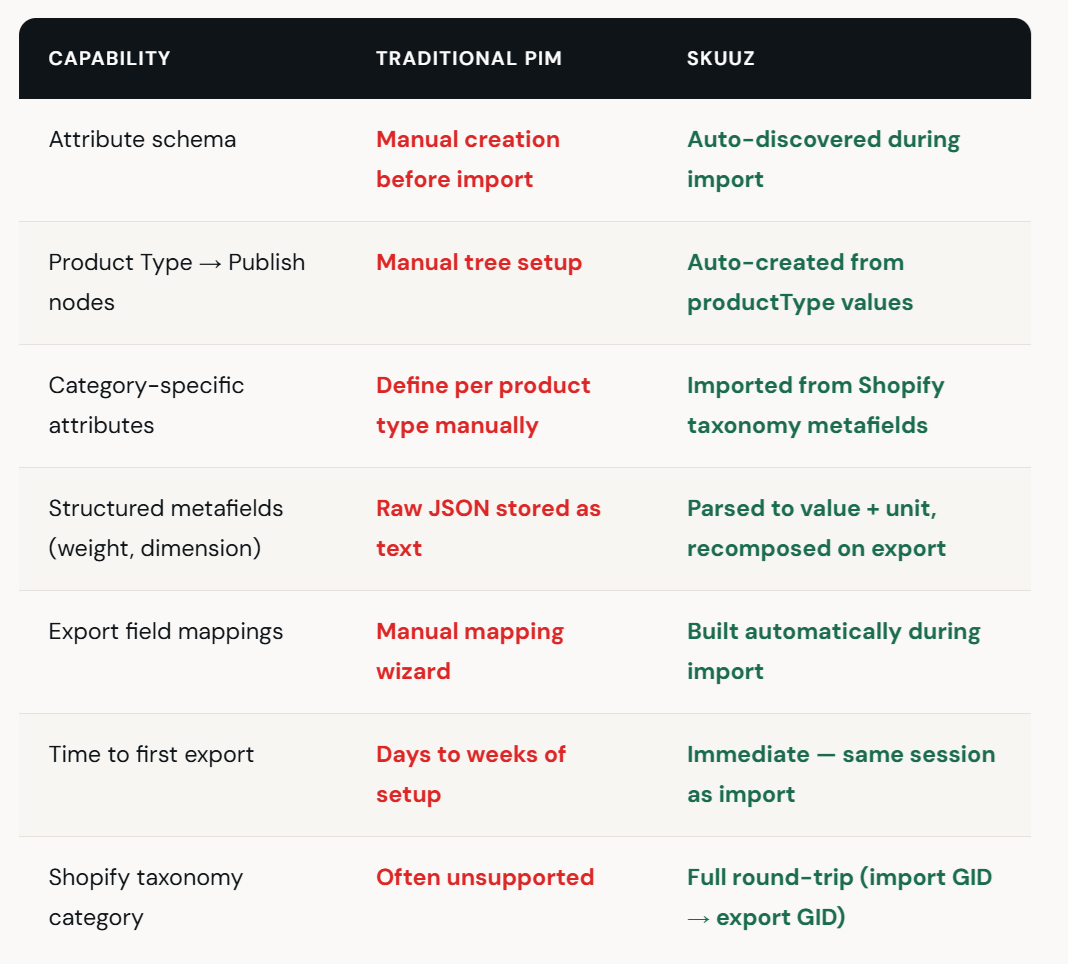
The Technical Architecture
Under the hood, the import is a single PostgreSQL function — pull_shopify_products — that receives the full GraphQL response from Shopify and processes it atomically. In one transactional call, it:
Upserts products and variants with conflict resolution (prefer PIM edits or prefer Shopify data — configurable per channel). Existing products are updated; new ones are created. Variants are matched by Shopify GID and upserted with full price, SKU, barcode, and option data.
Seeds the attribute schema by inspecting every field present in the incoming data. If a metafield namespace/key combination hasn't been seen before, it creates the attribute metadata entry with the correct type mapping and a human-readable display label.
Extracts and stores every attribute value in a flexible Entity-Attribute-Value (EAV) model. This means your PIM isn't locked to a fixed column schema — when Shopify adds a new metafield to your products, the next import picks it up automatically.
Processes taxonomy categories via a secondary pipeline that imports the Shopify category ID, creates or matches the category hierarchy entry, and links category-specific attribute definitions — the metafield definitions that Shopify associates with that taxonomy node.
Auto-creates Publish Hub nodes from the distinct productType values in the imported data. If your store has products typed as "Snowboard," "Gift Cards," and "Accessories," three nodes appear under your channel root after import — ready for you to attach whatever publish rules make sense for your workflow.
Creates bidirectional field mappings for every discovered field, storing the translation logic needed to convert PIM values back into Shopify's expected GraphQL input format.
All of this happens in under five seconds for a typical Shopify catalog. No background jobs, no "processing" spinners, no "check back in an hour."
Why This Matters for Merchants
The greenfield setup tax is the single biggest reason merchants abandon PIM evaluations. They sign up for a trial, realize they need to spend three days configuring schemas before they can even see their products, and decide the ROI isn't there. We've heard this story from dozens of Shopify merchants.
By making import do the work, SKUuz compresses the evaluation cycle from days to minutes. Connect your store, pull your products, and you're looking at an enrichment-ready PIM with your complete catalog, schema, categories, and export mappings already configured. Start editing product descriptions, adding feature bullets, or generating AI content immediately — and publish changes back to Shopify whenever you're ready.
That's not a migration. That's onboarding that respects your time.
AI-First Product Catalog Management
SKUuz is the AI-powered PIM built for Shopify merchants. Enrich product data with AI-generated descriptions, manage products and variants at scale, bulk-edit in a spreadsheet-style grid, and publish to Shopify with one click. Stop wrestling with spreadsheets — let AI do the heavy lifting.